Made in Switzerland · free · offline
Know where your money goes. Privately.
RizKharj is a simple tracker for personal income and expenses: accounts, budgets, savings goals and reports, all on your device and with no account. Built for Persian speakers in Europe and worldwide, it works in any country with your own currency, and has a German and English interface too.

Why RizKharj
- No accountNo sign-up, no password, no server
- Fully offlineWorks without an internet connection
- Data on your deviceYour records are never sent to us
- Any currency, any country156 currencies, 3 languages, 2 calendars
Everything for everyday money
Complete, without clutter. Use each part when you need it.
-
Accounts and net worth
Bank, cash and card accounts, each in its own currency: francs, euros, toman or any of 156 currencies, with your own exchange rates or the day's ECB rates. A single transaction can be in another currency too. Net worth always in view.
-
Income, expense, transfer, debt
Record every entry with the right type: income, expense, a transfer between accounts, or a debt.
-
Categories your way
Categories with sub-categories, such as Home › Rent, Electricity, Serafe, and 343 line icons so everything has its place.
-
Budgets and savings goals
Monthly and weekly budgets, a separate budget per category, and savings goals for the things that matter to you.
-
Who owes whom
Keep track per person of what you have lent or borrowed, in any currency: a debt in euros stays in euros. It is always clear who owes whom.
-
Recurring with reminders
Set up rent and subscriptions once, see them in the bills calendar and confirm each one when reminded. Native notifications in the iPhone and Android apps.
-
Receipt photos
Attach the receipt photo to any entry. Photos stay on the device.
-
Clear reports
Trends over 6 or 12 months, the last 8 weeks and each category's share, plus a month-end forecast and a year in review with PDF export, in the Jalali or Gregorian calendar.
156 currencies
In your currency, in any country
You choose a base currency for the totals, and each account can have its own currency with the exchange rate you enter yourself. 156 currencies from every region of the world, from francs and euros to toman and dirham.
- CHF Swiss Franc CHF
- € Euro EUR
- $ US Dollar USD
- £ British Pound GBP
- Toman Iranian Toman IRT
- AED UAE Dirham AED
- ₺ Turkish Lira TRY
- C$ Canadian Dollar CAD
A look inside
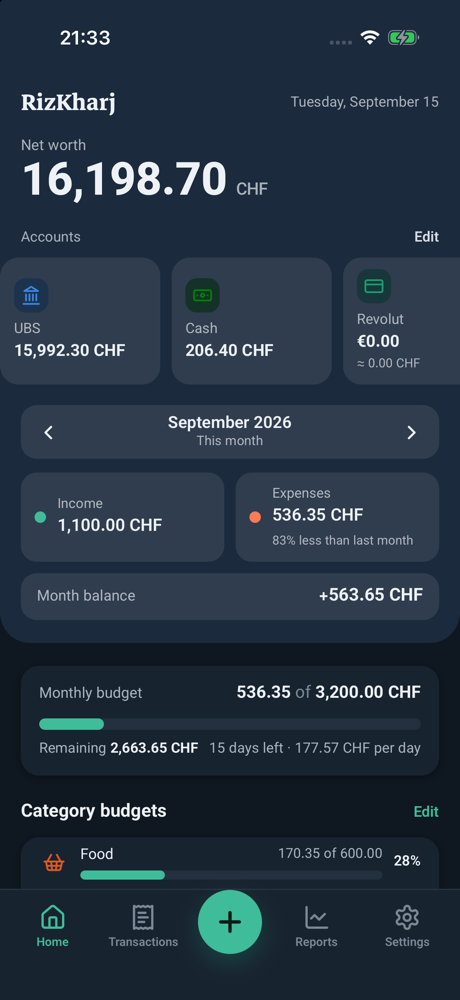
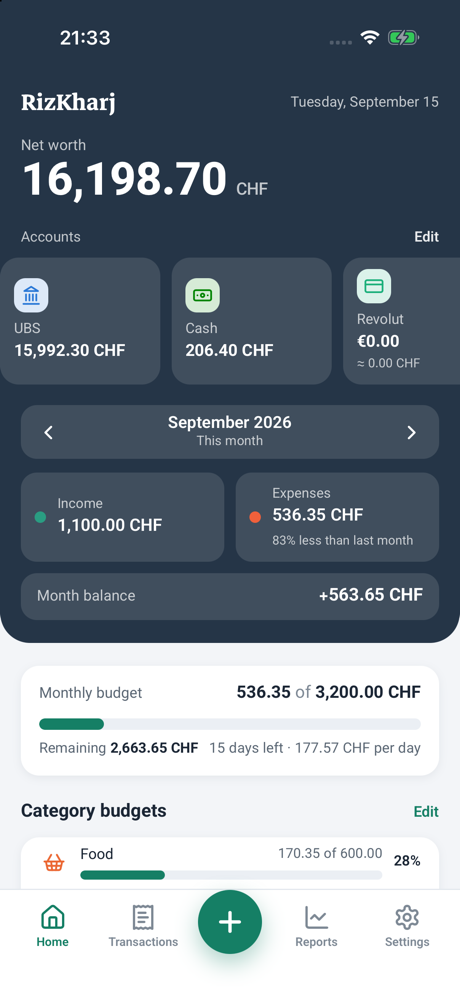
Real screens from the app with sample data in Swiss francs. Light, dark or system theme, as you prefer.
-
Home: net worth, accounts and the month at a glance -
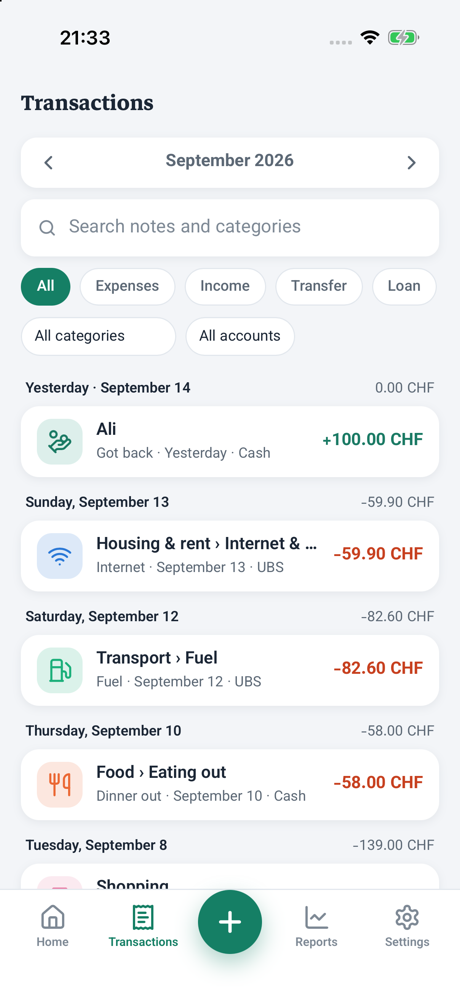
Transactions: search and filter by type, category and account -
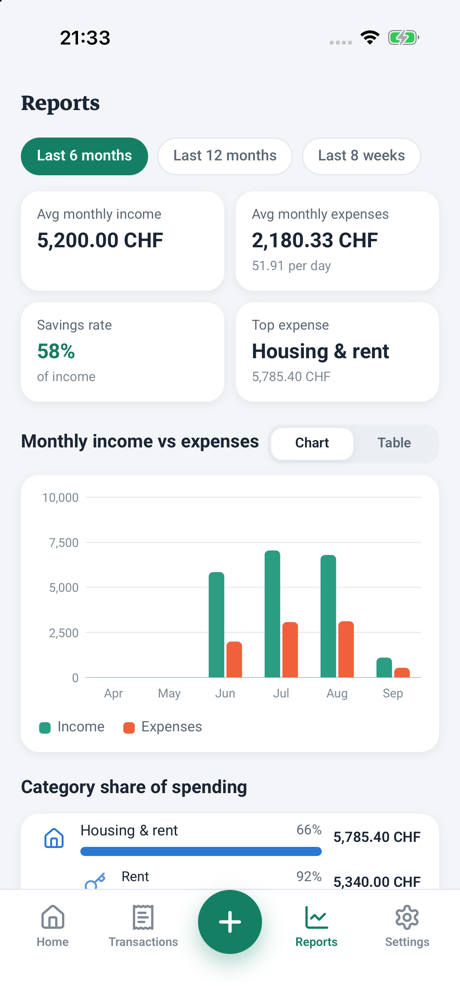
Reports: 6 months, income and expenses, each category's share -
Dark mode, automatic or manual -
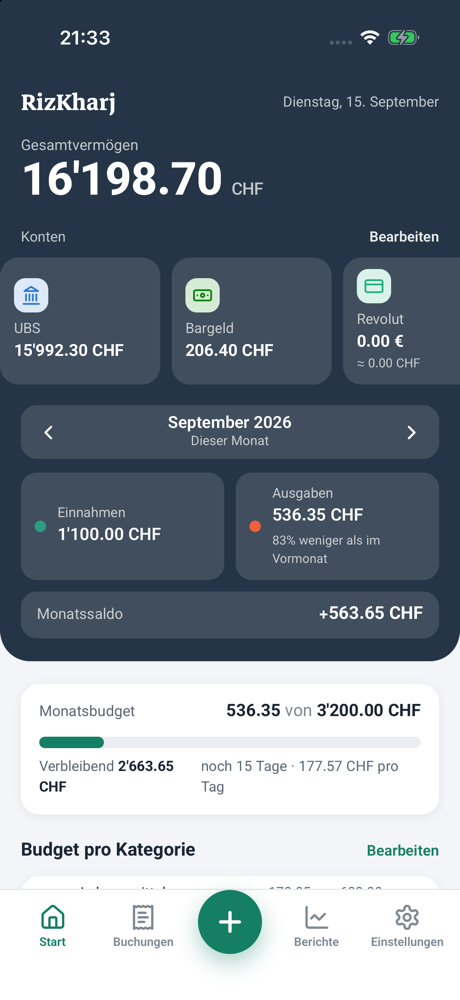
The same app in German; Persian is the third language
Private by design
RizKharj is built so that your financial data belongs to you alone.
Read the privacy policy- No account, no server, no ads, no analytics. Your data stays on your device; the app only goes online for the day's exchange rates for the currencies you use, automatic backup to your own iCloud Drive or Google Drive if you turn it on, and tips through the App Store or Google Play.
- PIN lock for the app, with Face ID or Touch ID on iPhone and iPad, so only you see your numbers.
- Backups are your own files: automatic backup and sync through your own iCloud Drive or Google Drive, a JSON backup you save yourself (optionally password-protected), plus CSV export.
Free · no ads · no subscription
Every feature, free for everyone
Since version 1.23.0 RizKharj is completely free. Everything that used to be Pro is open to everyone: no ads, no tracking, no account.
Everything included
- Unlimited accounts, goals, people, recurring items and loans
- Any currency per account and per transaction, with ECB rates if you like
- A budget per category, receipt photos, tags and split expenses
- Advanced reports with PDF export, plus CSV export
- Automatic backup and sync through your own iCloud Drive or Google Drive
- Widgets, bills calendar and bank statement import
- Family mode, separate books, PIN lock and colour themes
Support RizKharj optional
- Choose an amount and tip as often as you like
- A tip unlocks nothing: every feature is already yours
- It helps keep RizKharj free, ad-free and maintained
Settings › Support RizKharj
In the iPhone, iPad and Android app. Paid through the App Store or Google Play; we never see your payment details.
Bought RizKharj Pro earlier? You keep everything, and you are one of our early supporters. Thank you!
Nothing you enter is ever locked, and there are no limits on accounts, goals or anything else. A few things, such as widgets, automatic backup and notifications, need the iPhone, iPad or Android app.
Install in a few steps
The web app installs from the browser and works offline after the first load. No store and no account needed.
iPhone
- Open rizkharj.com/app in Safari
- Tap Share
- Choose "Add to Home Screen"
The iPhone app is also on the App Store; the badge is at the top of this page.
Android
- Open rizkharj.com/app in Chrome
- Tap the three-dot menu at the top
- Choose "Add to Home screen"
The Android app is now on Google Play; the web app works fully on Android too.
Desktop
- Open rizkharj.com/app in any current browser
- Be online the first time so the app loads fully
- Bookmark the page; after that it opens offline too
Data stays in that browser; to move to your phone, use the JSON backup.
From the guides
Short, practical articles on tracking expenses, budgeting and saving.
-
How to choose an expense tracker app: 8 criteria (privacy first)
Notebook, spreadsheet, banking app or a dedicated expense tracker? The trade-offs, and eight criteria to check before you trust an app with your income, rent and debts.
-
The 50/30/20 budget rule, with a real example in CHF and EUR
The simplest way to budget: 50% needs, 30% wants, 20% savings. A worked example for a Swiss and a German salary, five steps to put it into practice and how to set it up in a budgeting app.
-
Why your expense tracker should work offline and without an account
Your spending history is the most revealing data you own. What cloud budgeting apps do with it, what "stored on your device" really means, and answers to the three usual worries about offline apps.
Frequently asked questions
Missing an answer? Write to hello@rizkharj.com.
Where is my data stored?
On your device. RizKharj has no account and no server of its own, and never sends your data to us. If you turn on automatic backup, a copy is kept in your own iCloud Drive or Google Drive.
What if I change my phone?
In the iPhone, iPad or Android app, turn on Settings › Data & backup › Automatic backup; on the new phone, choose "Restore from iCloud Drive / Google Drive" when you first open the app. Or tap "Back up", save the file to iCloud Drive or Google Drive, and on the new phone tap "Restore from backup" and pick that file.
Does it need internet?
No. Everything works offline. The app only goes online for these things: the day's exchange rates for the currencies you use (only currency codes are sent), for automatic backup to your own iCloud Drive or Google Drive, or to leave an optional tip through the App Store or Google Play.
Is there a price or subscription?
No. Since version 1.23.0 RizKharj is completely free: every feature for everyone, with no ads, no tracking and no subscription. If it helps you, you can leave an optional tip in the iPhone, iPad or Android app under Settings › Support RizKharj; it goes through the App Store or Google Play and unlocks nothing. If you bought RizKharj Pro earlier, you keep everything. Thank you for being one of our early supporters!
Can I have accounts in other currencies?
Yes. Each account can have its own currency; the day's European Central Bank rates are fetched automatically for currencies with a reliable source, and you can enter your own under Settings › Accounts & budget › Exchange rates (toman and rial are always manual). A single transaction or debt can be in another currency too: tap the currency next to the amount, and the converted amount for the account is suggested and can be changed.
Which currencies are supported?
156 currencies from every region of the world, from Swiss francs and euros to toman, dirham and lira, plus Tether and Bitcoin. The full list is in the Currencies section on this page.
Are receipt photos in the backup?
No. Photos stay on the device; the backup file contains transactions and settings only.
Is RizKharj on the App Store and Google Play?
Yes. The iPhone and iPad app is on the App Store, and the Android app has been on Google Play since 26 October 2026; the badges on this page link straight to them. The web app also works fully on Android and desktop and installs from the browser to your home screen.
Can backups be password-protected?
Yes, optionally. In Settings › Data & backup you can set a “backup file password”; from then on the backup file and the iCloud/Drive copy are locked with AES-256. A file created with a password always opens with that password, even if you later remove the password in the app; removing it only makes future backups password-free and replaces the cloud copy with an unlocked one.
Start today, no sign-up
Open the web app, record your first entry and keep it on your home screen. Free, offline, on your device.